

Automate the Work Around Your Product
We build AI-powered workflows around your product — connecting users, data, APIs, business systems, and your team so repetitive processes happen automatically while important decisions remain under control.
AI workflows · APIs · Integrations · Custom logic · n8n / Make / Zapier
When the Workflow Matters, Reliability Matters Too
Connecting two apps is easy. The harder part is designing what happens when data is missing, an API fails, AI returns the wrong structure, a customer responds unexpectedly, or an important action needs human approval.
Workflow Design
Map triggers, decisions, dependencies, ownership, and exception paths before automating the process.
Integrations
Connect product data, SaaS tools, databases, CRMs, messaging platforms, payment systems, and external APIs.
AI Decision Support
Use LLMs for classification, extraction, summarization, generation, routing, and structured outputs where ambiguity exists.
Custom Logic
Use Node.js, Python, serverless functions, databases, and APIs when automation platforms alone cannot safely support the workflow.
“No-code where it works. Custom engineering where it matters.”
Automate the Work That Happens Around the Product
Some workflows happen directly inside the application. Others connect the product to customers, internal teams, CRM systems, payments, communication channels, or external services.
Product & User Workflows
Product-triggered automation, onboarding flows, account lifecycle events, approvals, background processing, product notifications, user state changes, product-to-business-system synchronization.
AI Processing
Document extraction, summarization, classification, structured outputs, content transformation, knowledge retrieval, AI-assisted decision support.
Customer Operations
Customer onboarding, approval workflows, reminders, account updates, service status changes, support routing, customer communications.
Payments & Commerce
Stripe events, subscription workflows, payment-triggered actions, Shopify workflows, order processing, inventory synchronization, operational notifications.
Leads & CRM
Lead capture, enrichment, qualification, CRM updates, routing, follow-ups, sales notifications.
Internal Operations
Team notifications, task creation, data synchronization, spreadsheet replacement, reporting workflows, internal approvals, operational handoffs.
The Workflow Is More Than the Automation Tool
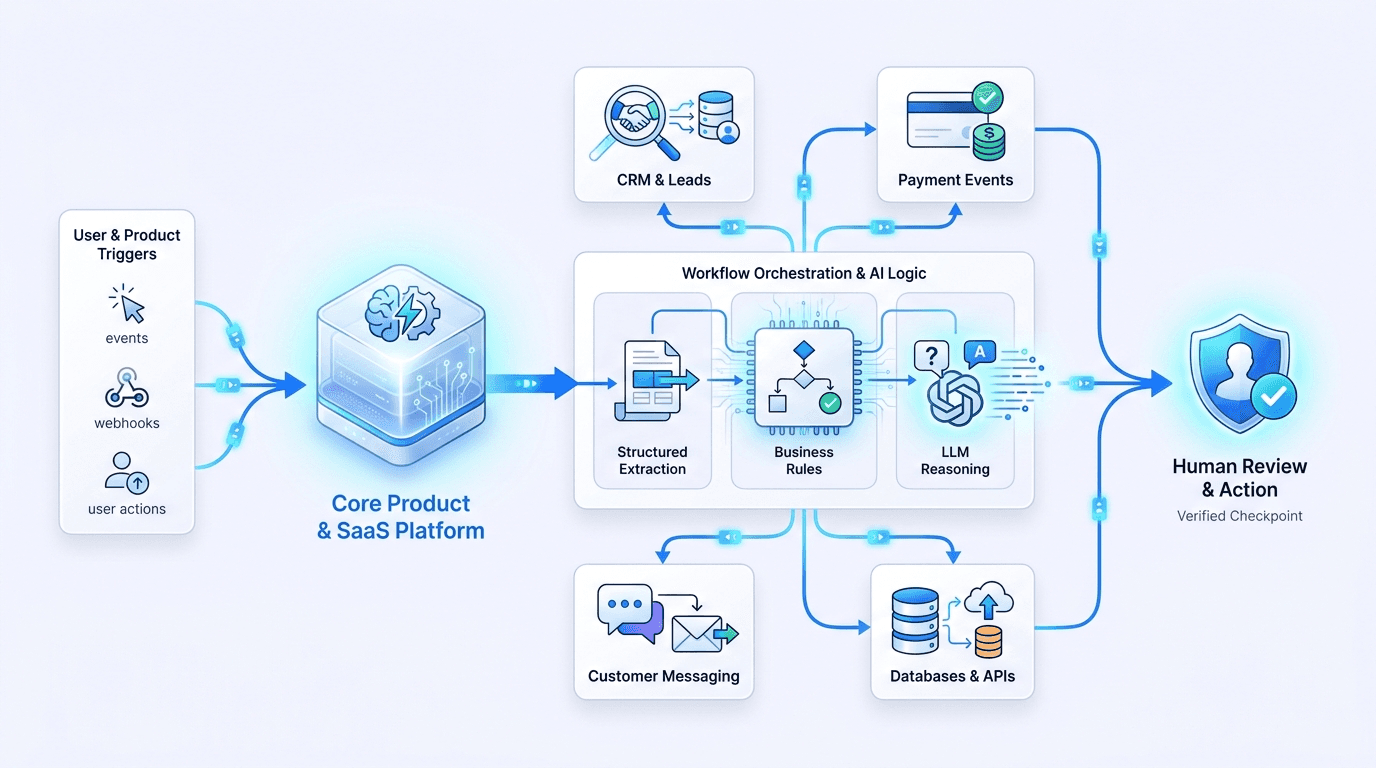
Reliable automation depends on the systems around the workflow — product events, data, APIs, validation, permissions, failure handling, AI boundaries, and human review.
Product & Triggers
User actions, product events, forms, webhooks, schedules, CRM changes, external events
Orchestration
n8n, Make, Zapier, queues, serverless workflows, scheduled jobs
Business Logic
Validation, routing, conditions, transformations, permissions, product rules
AI Layer
OpenAI, Claude, extraction, classification, RAG, structured outputs
Tools & System Access
REST APIs, webhooks, MCP-compatible tools, databases, internal services, third-party systems
Actions
Product updates, CRM actions, messages, emails, payments, tasks, documents, notifications
Review & Observability
Human approval, logging, retry paths, exception handling, error visibility
Use AI Where Rules Alone Aren't Enough
Traditional automation works well when every decision can be expressed as a rule. AI becomes useful when the workflow needs to interpret language, documents, context, user intent, or other unstructured information.
Structured Extraction
Turn emails, forms, documents, messages, or other unstructured inputs into usable structured data with strict schema validation.
Classification & Routing
Identify intent, category, priority, or workflow path before passing work to the correct product process, system, or person.
Knowledge-Aware Workflows
Use RAG and approved product or business knowledge when the workflow requires context beyond a single static prompt.
Generative Tasks
Draft responses, documents, summaries, recommendations, or internal content with clear boundaries and review points.
“AI handles ambiguity. Business rules protect the workflow. Humans remain responsible for important decisions.”
Not Every Workflow Needs an Agent
Agents are useful when a task genuinely requires multiple decisions, tools, or changing steps. Simpler deterministic workflows are often easier to maintain and more reliable.
Use Structured Automation When:
- The sequence of operations is predictable from the start.
- Fixed business logic and strict rules govern every branch.
- Deterministic sequence and 100% repeatability matter most.
- Reliability and auditability take priority over autonomy.
- A direct API call or webhook solves the task without ambiguity.
Use an Agent When:
- The execution path dynamically depends on changing run-time context.
- Several tools must be selected and composed dynamically.
- Unstructured information determines what tool or action comes next.
- Multiple intermediate reasoning steps are required prior to output.
- Bounded autonomy adds clear, quantifiable product value.
TECHNICAL NOTE: Agents can interact with approved product tools through APIs or MCP-compatible interfaces when that architecture genuinely simplifies tool access.
Automate Repetition. Keep Judgment Visible.
High-value workflows often work best when automation prepares the decision and a person controls the important action.
Typical Approval Points We Implement:
What Happens When Something Goes Wrong?
The happy path is only part of the workflow. Production automation also needs to handle missing data, duplicate events, API failures, rate limits, unexpected responses, and retries.
Pre-Flight Validation
Check inputs and enforce strict type constraints before the workflow continues down the pipeline.
Deduplication Keys
Avoid duplicate actions, double charges, or spam sends when product events or webhooks are retried.
Exponential Backoff
Handle temporary API rate limits, network timeouts, and downstream drops safely with automated retry queues.
Graceful Degradation
Provide alternate operational paths and secondary fallback models when AI or an external service fails.
Execution Traces
Make important workflow state shifts, payload dumps, and micro-failures visible via real-time monitoring.
Dead-Letter Alerting
Route fatal exceptions directly to the right engineer or operator instead of failing silently in the background.
From Workflow Idea to Reliable Automation
Map
Understand the product workflow, manual steps, systems involved, edge cases, and business outcome.
Simplify
Remove unnecessary intermediate steps, redundant rules, and bloated dependencies before automating.
Architect
Decide what belongs in the product, automation platform, custom backend logic, AI layer, or human review.
Build & Test
Implement integrations, custom logic, AI pipelines, APIs, validation routines, and edge-case handling.
Operate
Deploy, document, monitor, and make the workflow transparent for the team that will maintain it.
“Automation should reduce operational complexity — not hide it inside an impossible-to-maintain workflow.”
Automation Connected to Real Products and Operations
ZeitFilter AI Call Agent
Voice agent for vendor follow-up and customer inquiry resolution
A production voice agent that follows up with unresponsive vendors, discusses customer requirements, captures the outcome, and sends the response back through email and app notifications, with real-time Arabic and English conversation support.
Article Analysis
Turning an AI analysis engine into a published Chrome extension
What began as an internal workbench for validating prompts, analysis logic, and structured LLM outputs was productized into a Chrome extension backed by a dedicated analysis service.
Nayax → Shopify
Middleware connecting vending operations with Shopify inventory
A middleware system connecting Nayax-linked machine operations with Shopify inventory workflows, designed to support expansion across a larger machine network.
Exit System
Payment-triggered customer communication workflows
A backend workflow combining Stripe events, Twilio SMS and voice capabilities, serverless infrastructure, and PostgreSQL to support automated onboarding and customer communication flows.
Automation That Can Grow With the Product
Many workflows eventually need custom APIs, application logic, databases, internal tools, or customer-facing software. Our product engineering background means the automation does not have to stop where the workflow platform does.
Product + Workflow Thinking
We design automations as extensions of your core product lifecycle, preserving data consistency and high UX standards.
Workflow + Software Engineering
We bridge no-code agility with standard Git versioning, environment management, and production-grade CI/CD pipelines.
AI With Boundaries
Rigid guardrails, deterministic data schemas, and human checkpoints keep generative unpredictability contained.
API-First Ownership
No locked proprietary connectors. You retain complete ownership of logic, database schemas, and external API integrations.
The Same Engineering Approach Works Across the Business
The same architecture can also automate operational workflows outside the product — connecting CRM systems, internal tools, e-commerce operations, customer communication, reporting, and team processes.
What Should Happen Automatically Around Your Product?What Should Happen Automatically Around Your Product?
Show us the product, workflow, systems involved, and the repetitive work happening today. We can help identify what should be automated, where AI adds value, and whether the right solution is no-code, custom engineering, or a combination of both.Show us the product, workflow, systems involved, and the repetitive work happening today. We can help identify what should be automated, where AI adds value, and whether the right solution is no-code, custom engineering, or a combination of both.